Blog
お役立ち情報
Next.js+Hono+Imgixで実現!動的OGP生成
投稿日:2025.07.28

Imgixとは
Imgixとは画像をリアルタイムに変換・最適化・配信出来るCDNサービスです
URLパラメータで画像の加工が出来るためアプリ・Webにて柔軟な実装が可能です
プランについて
Imgixでは様々なプランを用意しています
またどのようなプロジェクトにはどのプランが良いか例も記載してあるのでプラン選びがしやすいです
- STARTER
- 料金:月額25ドル
- BASIC
- 料金:月額75ドル
- GROWTH
- 料金:月額300ドル
- ENTERPRISE
- 料金:お問い合わせにより変動
またFreeトライアルが存在するので試しに使いたい人は初めにFreeトライアルから始めるのが良いです
30日または100クレジットまで使用できます
https://www.imgix.com/jp/pricing
ストレージについて
Imgixは様々なストレージサービスに対応しており既存の画像リソースをそのまま使って最適化配信が可能です
公式はGoogle Cloud Storageを推奨しています
https://docs.imgix.com/ja-JP/getting-started/setup/creating-sources
実装
記載しているコードはImgixを使用したOGP実装をメインにしています
もし全体像を確認したい場合は下記Githubリポジトリからご確認してください
https://github.com/roll1226/next-hono-imgix
使用技術
タイトルにあるように
- フロントエンドにはNext.jsを使用
- バックエンドにはHonoを使用
- HonoのRCP機能を利用してNext.jsのRoute Handlersをハイジャックする形で使用
Imgix処理の実装
今回は下記画像をベースにしてOGP画像を生成されるようにしていきます

Freeトライアルだとクレジットの上限が決まっているためsandboxを使用してURLパラメータを決めていきます
https://sandbox.imgix.com/create
URLパラメータが決まったらコードに落とし込んでいきます
./src/lib/imgix.ts
import { format } from “date-fns”;
const imgixUrlCache = new Map<string, string>();// テキスト長に応じてフォントサイズを動的調整
const getOptimalFontSize = (text: string): string => {
const length = text.length;
if (length <= 10) return “56”;
if (length <= 15) return “52”;
if (length <= 20) return “48”;
if (length <= 25) return “44”;
return “40”;
};// テキスト長に応じてパディングも調整
const getOptimalPadding = (text: string): string => {
const length = text.length;
if (length <= 15) return “60”;
if (length <= 25) return “80”;
return “100”;
};export const generateImgixOgpUrl = (title: string, createdAt: Date): string => {
const cacheKey = `${title}:${createdAt}`;if (imgixUrlCache.has(cacheKey)) {
return imgixUrlCache.get(cacheKey)!;
}const imgixDomain = process.env.IMGIX_URL || “your-imgix-domain.imgix.net”;
const baseImage = “yep/ogp.jpg”;const fontSize = getOptimalFontSize(title);
const padding = getOptimalPadding(title);// 投稿日のフォーマット
const formattedDate = format(createdAt, “yyyy/MM/dd”);const params = new URLSearchParams({
txt: title, // タイトルテキスト
“txt-size”: fontSize, // 動的にフォントサイズを設定
“txt-color”: “333333”, // テキストカラー
“txt-align”: “center,middle”, // 中央揃え
“txt-pad”: padding, // パディングを動的に設定
“txt-font”: “Hiragino Sans W6”, // 日本語に適したフォント
“txt-fit”: “max”, // テキストを領域内に自動収束
“txt-width”: “1000”, // テキスト幅を少し狭めて確実に収める
“txt-line-height”: “1.5”, // 日本語に適した行間
“txt-shad”: “2”, // 少し影を付けて可読性向上
w: “1200”, // OGP画像の幅
h: “630”, // OGP画像の高さ
fit: “crop”, // 画像をクロップしてフィット
auto: “format”, // 自動フォーマット
q: “90”, // 画質を高めに設定
});// 投稿日をblendで左下に追加
const dateImageUrl =
“https://assets.imgix.net/~text” +
`?txt=${encodeURIComponent(formattedDate)}` + // 日付テキスト
`&txt-size=24` + // フォントサイズ
`&txt-color=666666` + // 日付のテキストカラー
`&txt-font=${encodeURIComponent(“Hiragino Sans W6”)}` + // フォント
`&txt-align=left,bottom` + // 左下に配置
`&txt-pad=40` + // パディング
`&w=1200` + // OGP画像の幅
`&h=630`; // OGP画像の高さparams.set(“blend”, encodeURIComponent(dateImageUrl));
params.set(“blend-mode”, “normal”);const url = `https://${imgixDomain}/${baseImage}?${params.toString()}`;
if (imgixUrlCache.size >= 100) {
const firstKey = imgixUrlCache.keys().next().value;
if (firstKey) {
imgixUrlCache.delete(firstKey);
}
}
imgixUrlCache.set(cacheKey, url);return url;
};
バック側の実装
Honoでの実装になりますがバリデーション部分はTypescriptだけで完結出来るように Drizzle + drizzle-zod + Hono + Zod Validator の組み合わせで実装していきます
./src/app/api/[[…route]]/post.ts
import { db } from “@/db”;
import { posts } from “@/db/schema”;
import { generateImgixOgpUrl } from “@/lib/imgix”;
import { zValidator } from “@hono/zod-validator”;
import { eq } from “drizzle-orm”;
import { Hono } from “hono/tiny”;
import { z } from “zod”;const schema = z.object({
id: z.string().regex(/^d+$/, “Invalid ID format”),
});const app = new Hono().get(
“/ogp/:id”,
zValidator(“param”, schema),
async (c) => {
try {
const { id } = c.req.param();
const numericId = parseInt(id);if (isNaN(numericId)) return c.json({ error: “Invalid ID” }, 400);
const resPosts = await db
.select()
.from(posts)
.where(eq(posts.id, numericId));
const post = resPosts.at(0);
if (!post) return c.json({ error: “Post not found” }, 404);const ogpUrl = generateImgixOgpUrl(post.title, post.createdAt);
return c.json({
ogpUrl,
title: post.title,
description: post.description,
});
} catch (error) {
console.error(“Failed to generate OGP:”, error);
return c.json({ error: “Failed to generate OGP” }, 500);
}
}
);export default app;
./src/app/api/[[…route]]/route.ts
import { Hono } from “hono”;
import { handle } from “hono/vercel”;
import post from “./post”;export const dynamic = “force-dynamic”;
export const revalidate = 0;const app = new Hono()
.basePath(“/api”)
.route(“/posts”, post);export type AppType = typeof app;
export const GET = handle(app);
export const POST = handle(app);
export const PUT = handle(app);
export const DELETE = handle(app);
フロント側の実装
バックエンドが実装出来たらフロントエンド側で呼び出せるようにServerActions機能を利用して実装をしています
./src/app/api-access.ts
import { client } from “@/lib/hono”;
import { GetParams } from “./api/[[…route]]/post”;export const getHonoOgpById = async (params: GetParams) => {
try {
const res = await client.api.posts.ogp[“:id”].$get({
param: { id: params.id },
});
if (!res.ok) {
if (res.status === 404) {
return null; // 404の場合はnullを返す(OGPが見つからない)
}
throw new Error(`HTTP error! status: ${res.status}`);
}
return res.json();
} catch (error) {
console.error(`Failed to fetch OGP ${params.id}:`, error);
if (error instanceof Error && error.message.includes(“404”)) {
return null;
}
throw new Error(“OGPデータの取得に失敗しました”);
}
};
./src/app/server-action.ts
“use server”;
import { getHonoOgpById } from “./api-access”;export const getOgp = async (id: string) => {
try {
return await getHonoOgpById({ id });
} catch (error) {
console.error(`Server action error (getOgp ${id}):`, error);
throw error;
}
};
./src/app/posts/[id]/page.tsx
import { getOgp, getPost } from “@/app/server-action”;
import { Metadata } from “next”;type PostPageProps = {
params: Promise<{
id: string;
}>;
};export const generateMetadata = async ({
params,
}: PostPageProps): Promise<Metadata> => {
try {
const { id } = await params;
const ogpData = await getOgp(id);if (!ogpData) {
return {
title: “投稿が見つかりません”,
description:
“指定された投稿は存在しないか、削除された可能性があります。”,
};
}return {
title: ogpData.title,
description: ogpData.description || “投稿の詳細を表示しています”,
openGraph: {
title: `${ogpData.title} | yep demo post`,
description: ogpData.description || “投稿の詳細を表示しています”,
images: [
{
url: ogpData.ogpUrl,
width: 1200,
height: 630,
alt: ogpData.title,
},
],
},
twitter: {
card: “summary_large_image”,
title: `${ogpData.title} | yep demo post`,
description: ogpData.description || “投稿の詳細を表示しています”,
images: [ogpData.ogpUrl],
},
};
} catch (error) {
console.error(“Error generating metadata:”, error);
return {
title: “エラーが発生しました”,
description: “メタデータの生成中にエラーが発生しました。”,
};
}
};const PostPage = async ({ params }: PostPageProps) => {
try {return <p>通常はここに投稿データが表示される</p>;
} catch (error) {
console.error(“Error loading post:”, error);
return <p>エラーが発生しました</p>;
}
};export default PostPage;
デモページ
コードだけではわからない部分があるので実際に動作するページ用意しました
Freeトライアルの上限が来るまでは動作してくれますので、是非動かしてみてください
https://next-hono-imgix.vercel.app/
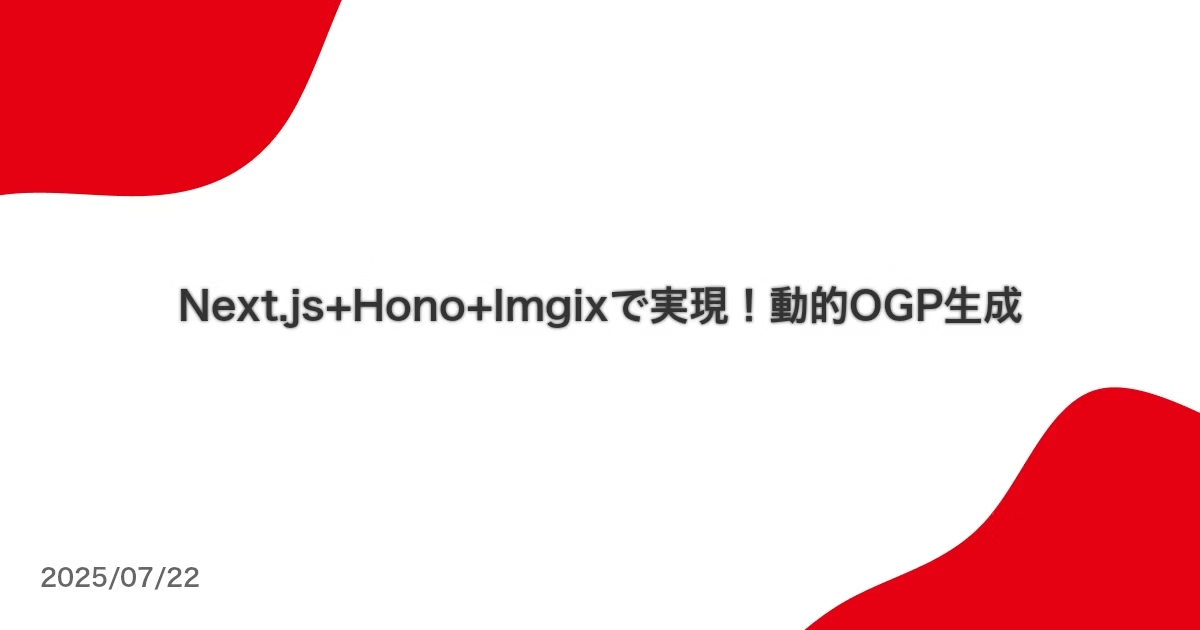
下記の形でOGPが動的に生成されます
まとめ
今回はOGP生成にImgixを使用していきました
OGPだけでなく画像をメイン押し出したサイト(予約サイトやメディアサイトなど)でパフォーマンスを向上させつつクリック率やクリックスルー率などを上げられる可能性もあります
また、レシート発行のような業務に使用される場面でも活躍するかもしれないです
使い方次第で無限の可能性があるImgixを是非一度触ってみてください

この記事をシェアする


関連記事
この記事をシェア


人気の記事







私たちにお話を聞かせてください!
お問い合わせはこちら

yepのこれまでの実績をご紹介
実績はこちら